Dove Laser Engrave File: Precision PNG for Crafters
If you spend any time in the world of laser engraving, you know that the difference between a mediocre project and a professional-grade piece often comes down to one thing: the source file. Too many crafters struggle with blurry edges, lost details, or files that simply don’t translate well from screen to material. That is exactly where the Dove Laser Engrave File steps in. This isn’t just another generic clipart download; it is a meticulously crafted digital asset designed specifically for the nuances of laser cutting and engraving machines.
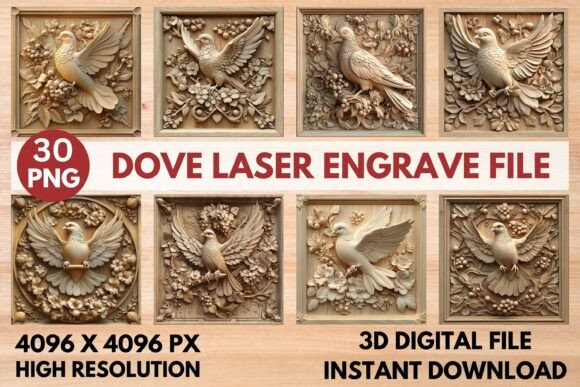
The design features an elegant dove, a symbol of peace and timeless charm, rendered in high-contrast grayscale. Whether you are looking to create intricate home décor, personalized wood signs, or delicate wall art, this file provides the clarity needed to make your vision come to life. It bridges the gap between artistic intent and mechanical precision, ensuring that every feather and curve is captured with crisp definition.
Why Grayscale PNGs Matter for Laser Engraving
Before diving into the specifics of the Dove design, it is crucial to understand why format matters so much in this hobby. While vector files like SVGs are excellent for cutting paths, they do not inherently control how a laser burns material unless paired with specific software settings. A raster image, particularly a high-resolution PNG, offers something different: tonal variation. When you use a premium font or detailed illustration in grayscale, your laser engine interprets the shades of gray as varying levels of power and speed.
This technique, known as dithering or grayscale engraving, allows for photorealistic results on materials like light woods, acrylics, and leather. The Dove Laser Engrave File leverages this capability perfectly. By providing 4096 x 4096 pixel images, the file ensures there is enough data density for your machine to render subtle shadows and highlights without pixelation. For enthusiasts using tools like Glowforge, xTool, or Sculpfun, this level of detail transforms a simple outline into a textured, three-dimensional artwork.
Visual Characteristics and Appeal
The visual personality of this design is rooted in simplicity and grace. The dove is depicted in a style that balances realism with artistic stylization, making it versatile for various applications. The grayscale palette is not random; it is calibrated to burn cleanly. Darker areas correspond to deeper burns, while lighter grays create soft, atmospheric backgrounds. This approach avoids the harsh, blackened look that can sometimes plague poorly optimized designs.
For designers and brand strategists, this aesthetic translates to a sense of calm and sophistication. In brand identity projects, such imagery conveys trust and serenity. For personal crafters, it adds a touch of elegance to gifts and keepsakes. The design works because it respects the limitations and strengths of the laser medium, avoiding overly complex lines that might clog or distort during the burning process.
Practical Applications Across Creative Projects
One of the strongest selling points of the Dove Laser Engrave File is its versatility. Because it is provided as a ready-to-print PNG, it integrates seamlessly into almost any workflow. You are not limited to just wood. The high contrast makes it suitable for engraving on slate, glass (with proper preparation), metal coatings, and even certain textiles. Here is how different users can apply this asset:
- Home Décor and Wall Art: Create framed pieces that serve as focal points in living rooms or bedrooms. The peaceful imagery pairs well with minimalist interior design trends.
- Personalized Gifts: Engrave these designs on wooden cutting boards, jewelry boxes, or photo frames. The high resolution ensures that fine details remain visible even on small surfaces.
- Packaging Design: Small business owners can use this for custom packaging inserts. A beautifully engraved tag or box lid elevates the perceived value of your product.
- Apparel and Textiles: While primarily for hard materials, the design can be transferred onto fabric for unique embroidered-style looks or used in sublimation workflows if converted appropriately.
- Social Media Graphics: Use the high-res PNG for digital marketing materials. The clean lines and professional quality make it ideal for Instagram posts or Pinterest pins promoting your craft business.
For bloggers and content creators, having access to such high-quality design assets means less time searching for stock photos and more time creating. Instead of worrying about copyright issues or low-resolution downloads, you get a commercial-ready file that enhances your editorial design.
Technical Specifications and Software Compatibility
Understanding the technical side ensures you get the best results. The package includes 15 coloring PNG files and 15 grayscale PNG files, all at 4096 x 4096 pixels. This variety allows you to experiment with different color palettes if you plan to use post-processing techniques or combine layers. However, for pure laser engraving, the grayscale versions are your primary tool.
Compatibility is broad. The file works natively with industry-standard software like LightBurn and Glowforge’s own interface. If you are using LightBurn, note that the file is dithered with a Jarvis filter. This is a significant advantage. The Jarvis filter helps distribute the "burn" evenly across the image, preventing banding and ensuring smooth gradients. It reduces the need for manual adjustments, saving you time and reducing frustration.
However, remember that this is not a layered SVG or a cut file. You cannot easily isolate individual elements within the dove without advanced editing skills. Instead, think of it as a complete image block. You should resize it as needed for your specific project dimensions. Most modern laser software handles scaling well, but always preview your job before starting the laser to ensure proportions are correct.
Recommended Settings for Optimal Results
To achieve the stunning 3D effect advertised, following recommended settings is key. These guidelines serve as a starting point; always test on scrap material first, as wood density and moisture content can affect outcomes.
- Speed and Power: For Glowforge users, a common baseline is Speed 1000 and Power 90. Adjust these based on the thickness and type of wood. Lighter woods like basswood or birch may require lower power to prevent charring.
- Mode: Set your machine to Grayscale mode. This tells the laser to vary power based on pixel brightness.
- Quality: Aim for Max Quality with an LPI (Lines Per Inch) of 270. This high line frequency captures the finest details of the dove’s feathers.
- Passes: Single pass is usually sufficient due to the high resolution. Multiple passes can darken the image too much.
- Masking: No masking is required. The software will handle the transparent background automatically.
For LightBurn users, ensure your image processing settings match the Jarvis filter recommendation. This ensures that the transition between light and dark areas remains smooth. Experimenting with these variables is part of the fun of laser engraving, but having a reliable starting point accelerates your learning curve.
Evaluating Fit for Your Workflow
When considering whether to add the Dove Laser Engrave File to your collection, consider your current project needs. If you frequently create nature-themed or symbolic designs, this file fills a niche that generic clipart often misses. Its professional polish makes it suitable for commercial use, allowing you to sell finished products without worrying about licensing restrictions on the design itself.
Readability and visual hierarchy are maintained even at smaller sizes. This is rare for intricate illustrations. The bold contrasts ensure that the subject remains clear, which is vital for items like tableware or small accessories where viewers won’t have the chance to inspect every detail up close. For web design or social media graphics, this clarity translates to better engagement, as the eye is drawn immediately to the central figure.
Ultimately, this file is a practical investment for anyone serious about their craft. It removes the guesswork from file preparation and focuses on delivering beautiful, consistent results. Whether you are a seasoned pro tweaking your latest batch of orders or a beginner taking your first steps into laser engraving, the Dove Laser Engrave File offers a reliable path to professional-looking creations.