Ice Cream Laser Engrave File: High-Quality 3D PNG
Creating professional-grade laser engravings often requires more than just a standard vector file; it demands precise tonal depth and high-resolution data to translate digital designs into physical textures. The Ice Cream Laser Engrave File addresses this need by providing a specialized resource designed specifically for the nuances of laser engraving technology. This is not merely a decorative image but a technical asset engineered to produce stunning 3D effects on various materials, from light woods to acrylics.
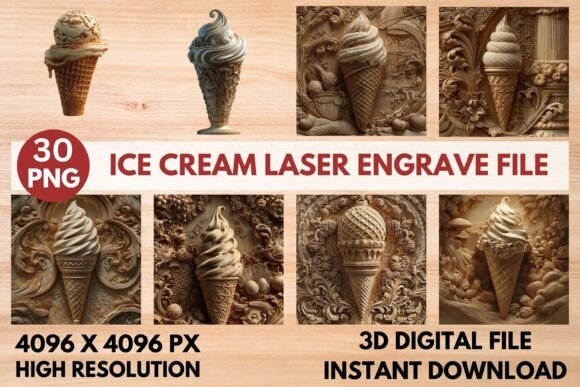
For hobbyists and small business owners alike, the difference between a flat, monochromatic engraving and one with rich, varied shading can be the difference between a mediocre craft project and a premium product. This file set offers exactly that level of detail. By utilizing grayscale PNGs at a resolution of 4096 x 4096 pixels, users can achieve crisp, intricate outputs that capture the delicate swirls of ice cream scoops, the texture of waffle cones, and the subtle highlights of sprinkles. These elements are critical for creating designs that feel tactile and visually engaging when etched into surfaces.
Understanding the Technical Advantages
The core value of this Ice Cream Laser Engrave File lies in its format and resolution. Unlike standard JPEGs or low-res PNGs that may pixelate or lose detail when scaled, these files are provided in original grayscale format with transparent backgrounds. Grayscale is particularly important for laser engravers because it allows the machine’s software to interpret different shades as varying power levels. Lighter grays typically result in lighter etches, while darker areas command higher power, creating natural shadows and depth without requiring complex masking or manual dithering adjustments.
This transparency is another significant benefit. When designing home decor items, stationery, or textiles, you often need to overlay your design onto other elements or place it within specific boundaries. A transparent background ensures that no white boxes or unwanted borders interfere with the final composition. Whether you are preparing a design for a wooden cutting board, a leather journal cover, or a custom packaging box, the clean edges allow for seamless integration into your broader creative workflow.
Material Versatility and Compatibility
One of the most appealing aspects of this design pack is its broad compatibility. It is optimized for use with popular laser engraving machines such as Glowforge, xTool, Sculpfun, and various CO2 laser cutters. Furthermore, it works seamlessly with industry-standard software like LightBurn. This universality means that whether you are an experienced technician or a beginner setting up your first project, you can integrate these files into your existing setup with minimal friction.
The file is suitable for a wide range of materials, though results will vary based on surface properties. It performs exceptionally well on lighter woods, where the contrast between the engraved lines and the natural grain creates a beautiful, rustic aesthetic. Acrylic and leather also respond well to the high-contrast details provided by the grayscale images. However, it is crucial to note that darker materials may require adjusted settings to ensure visibility, and non-laser-compatible materials should obviously be avoided. Always test on a scrap piece of your chosen material before committing to a final production run.
Practical Applications for Creators and Businesses
The versatility of the ice cream theme makes this Ice Cream Laser Engrave File applicable across numerous industries. For those in the food and beverage sector, these designs can enhance branding on menus, coasters, or promotional giveaways. Imagine a coffee shop using these intricate ice cream patterns on wooden stirrers or custom takeout containers to create a memorable unboxing experience.
In the realm of home decor, the charm of these designs translates well to kitchenware. Engraving these patterns onto wooden serving boards, cheese knives, or ceramic tiles adds a whimsical yet sophisticated touch. Similarly, in the fashion and textile space, the high-resolution nature of the PNGs allows for detailed transfers onto fabric, tote bags, or apparel prints. The precision of the 4096 px resolution ensures that even small details remain sharp, which is vital for maintaining brand integrity and visual appeal.
Educators and parents may also find value in these files. While primarily intended for laser machines, the high-quality images can serve as inspiration for art projects or as templates for paper crafts. For small business owners selling on platforms like Etsy or Shopify, having access to unique, high-quality digital assets can reduce development time and increase the perceived value of handmade goods. Instead of spending hours trying to recreate a simple ice cream cone graphic from scratch, creators can focus on production and marketing.
Optimizing Your Results with Recommended Settings
To get the most out of the Ice Cream Laser Engrave File, understanding your machine’s settings is key. The included recommendations provide a solid starting point, particularly for Glowforge users. Setting the speed to 1000 and power to 90 in grayscale mode allows for a balanced approach that captures detail without burning through the material. Using "Vary Power" ensures that the laser adjusts its intensity according to the grayscale values, producing the desired 3D effect.
For users of LightBurn or other compatible software, the principle remains the same: prioritize quality over speed during testing. Starting with a max quality setting and an LPI (Lines Per Inch) of 270 helps maintain the fine details inherent in the design. If the engraving appears too faint, increasing the power slightly is advisable rather than slowing down the speed excessively, which can lead to uneven burns. One pass is generally sufficient for most applications, eliminating the need for time-consuming multi-pass operations.
It is also worth noting that no masking is required. This simplifies the pre-processing phase significantly. You can import the PNG directly into your design software, resize it to fit your canvas, and send it to the laser. The ability to resize as needed gives buyers flexibility, allowing them to adapt the design for everything from large wall art to small jewelry tags. However, remember that while resizing is possible, scaling up beyond the original dimensions may compromise the crispness of the fine details.
What Buyers Can Expect
Purchasing this file provides immediate access to a comprehensive zip package containing 15 coloring PNGs and 15 corresponding grayscale PNGs, all at 4096 x 4096 pixels. This dual-format approach offers flexibility; some users may prefer to work directly with the grayscale for direct engraving, while others might use the colored versions for reference or digital printing purposes. The files are not editable in terms of their vector structure, meaning they are raster images optimized for raster engraving processes. This is a standard practice for high-detail photographic-style engravings and ensures consistent performance across different machines.
Before purchasing, it is prudent to verify that your specific laser machine and software support PNG imports and grayscale processing. While compatibility is widespread, older or highly specialized industrial systems may have different requirements. Additionally, consider the end-use of your products. If you are creating items for children, the playful nature of the ice cream theme is ideal. For more formal corporate gifts, you might choose to pair the design with minimalist typography to balance the whimsy with professionalism.
Final Considerations for Success
Ultimately, the success of any laser engraving project depends on the synergy between the design file, the material, and the machine settings. The Ice Cream Laser Engrave File provides an excellent foundation by delivering high-fidelity imagery that respects the technical constraints of laser equipment. By leveraging its high resolution, transparent backgrounds, and grayscale optimization, creators can produce professional-looking results that stand out in a crowded market.
Whether you are looking to expand your product line with seasonal treats, add a personal touch to handmade gifts, or simply experiment with new design possibilities, this file set offers a reliable and efficient solution. Take advantage of the recommended settings, respect the limitations of your materials, and let the intricate details of the design shine through. With careful preparation and attention to detail, you can transform a simple digital file into a tangible work of art that delights customers and enhances your brand identity.