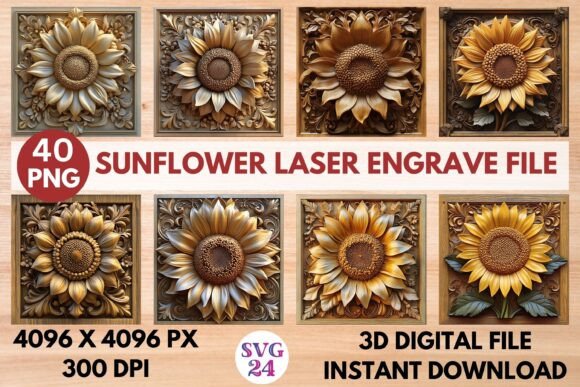
Unlock Creative Potential with the Sunflower Laser Engrave File
The Sunflower Laser Engrave File is a powerful digital resource for designers, crafters, and small business owners looking to elevate their projects with intricate and artistic laser engraving. This file set offers high-resolution PNG images optimized for laser cutting and engraving, making it an ideal choice for anyone wanting to add a touch of elegance or natural beauty to a wide range of products. Whether you're working on home decor, stationery, textiles, or tableware, these files provide a versatile foundation for your creative work.
What's Included in the Sunflower Laser Engrave File Package?
After purchasing the Sunflower Laser Engrave File, you'll receive a zip folder containing two distinct sets of 20 designs each:
- Coloring PNGs (4096x4096 pixels, 300dpi): These vibrant designs are perfect for adding color and visual interest to engraved surfaces. They can be used as stencils or guides for hand-painting or dyeing after engraving.
- Black and White PNGs (4096x4096 pixels, 300dpi): Ideal for traditional laser engraving techniques, these monochrome files offer clarity and precision for deep etching or cutting.
All images feature a transparent background, allowing for seamless integration into various design software and materials. The files are not editable in terms of vector format, but they come in a resolution that gives you the freedom to resize them while maintaining quality. This makes them suitable for both large-scale and detailed engraving tasks.
Applications Across Industries
The versatility of the Sunflower Laser Engrave File is one of its greatest strengths. These designs can be applied across multiple industries, helping you create custom products with minimal effort and maximum impact.
Home Decor Projects
Bring a touch of nature into any living space using sunflower motifs. You can engrave wooden picture frames, coasters, cutting boards, or decorative panels with these designs. The result is a unique, personalized item that adds warmth and style to homes. With the coloring options, you can even paint over the engravings to match specific interior themes or color palettes.
Woodworking and Furniture Making
Laser engraving has become a staple in modern woodworking. The Sunflower Laser Engrave File allows artisans to incorporate floral patterns into wooden signs, shelves, tables, and more. The high-resolution PNG ensures fine detail is preserved, which is essential when engraving on delicate or smooth wood surfaces. Since resizing is possible, you can adapt the design to fit different dimensions without compromising quality.
Stationery and Paper Crafts
From greeting cards to journal covers, sunflowers are a popular symbol of positivity and creativity. Using this file set, you can laser cut or engrave sunflower designs onto cardstock, leather, or other paper-based materials. The black-and-white PNGs are especially useful here for creating embossed or debossed effects. For those who enjoy mixed media, the coloring PNGs let you blend digital art with hand-drawn elements.
Textile Design and Fashion
For fashion designers or textile artists, the Sunflower Laser Engrave File opens up new possibilities. Use it to create fabric stencils for heat transfers, screen printing, or embroidery. It’s also excellent for engraving on leather accessories like bags, belts, or wallets. The transparent background makes aligning the design on fabric easy, ensuring accurate placement every time.
Tableware and Kitchen Accessories
Customized kitchenware is always in demand, and sunflower designs bring a fresh, inviting look to items like mugs, plates, and chopping boards. These files are particularly suited for ceramic or acrylic materials, where laser engraving can produce long-lasting, professional results. The high DPI ensures that even the smallest details in the flower petals and leaves are visible and crisp.
Prints and Apparel
If you're into print-on-demand services or running a small clothing line, consider using these designs for trendy apparel. The Sunflower Laser Engrave File can be adapted for T-shirts, hoodies, tote bags, and more. You can use it as a base for sublimation printing or laser-cutting fabric tags and labels. The inclusion of both color and black-and-white options means you have flexibility in how the design appears on different types of clothing and materials.
Why Choose High-Resolution PNG Files?
When it comes to laser engraving, image quality is everything. The 4096x4096 pixel resolution at 300dpi ensures that your laser machine can accurately translate the design into a physical product. Lower resolution images often result in blurry or distorted engravings, especially when scaled up. These files eliminate that risk by providing sharp, clear imagery that holds up under magnification and scaling.
Additionally, the transparent background of each PNG means there’s no extra layer or white space to worry about. This makes it easier to place the design precisely where needed, whether on a piece of wood, metal, or fabric. No need for manual cropping or editing — just download, prepare, and engrave.
Considerations Before Starting Your Project
While the Sunflower Laser Engrave File is incredibly versatile, there are a few things to keep in mind before beginning your project:
- Material Compatibility: Different materials respond differently to laser engraving. Test the design on a sample material first to ensure the depth and finish meet your expectations.
- Resizing Limitations: Although the PNGs are high-resolution, they aren't vector-based. That means if you stretch them too far beyond their original size, you may lose some detail. Always resize within reasonable limits based on your equipment capabilities.
- Software Requirements: Most laser engraving machines require specific design software such as Adobe Illustrator, CorelDRAW, or Inkscape. Ensure your workflow supports importing high-resolution PNGs for best results.
- Printing Techniques: If you plan to use the coloring PNGs for painting or dyeing, choose the right medium for your material. Some paints or dyes might bleed or fade depending on the surface type.
How to Integrate the Sunflower Laser Engrave File into Your Workflow
Using the Sunflower Laser Engrave File is straightforward. Once downloaded, open the ZIP folder and select the appropriate design for your project. Import the PNG into your design software, adjust the size as needed, and send it to your laser machine. The process works well with most CO2 laser cutters and engravers, including models from Epilog, Trotec, and Glowforge.
For beginners, it's important to understand how your laser machine interprets color versus grayscale. Many systems allow you to define how much power and speed should be used based on the shade or hue of the image. This lets you control the depth of the engraving or the intensity of the color transfer. Experimenting with these settings will help you achieve the desired aesthetic.
Real-World Examples and Scenarios
Let’s explore a few real-world applications of the Sunflower Laser Engrave File:
- Custom Jewelry Boxes: A boutique sells handmade jewelry boxes engraved with sunflower patterns. By using this file, they maintain consistency in design while offering customers a variety of styles to choose from.
- Festival-Themed Merchandise: During a summer music festival, vendors use the coloring PNGs to create painted sunflower designs on canvas tote bags and wooden keychains. The bright colors and detailed lines make the products stand out.
- Wedding Favors: A wedding planner incorporates the black-and-white PNGs into engraved wooden favor boxes. The elegant, minimalist look complements the overall theme of the event.
Maximizing Value and Creativity
To get the most out of your purchase, think beyond the obvious uses. The Sunflower Laser Engrave File can serve as inspiration for layered designs or combined with other motifs. For example, pair it with geometric shapes for a modern twist or with butterflies and bees for a garden-themed collection.
Another tip is to experiment with different materials. While wood is a common choice, try engraving on acrylic, glass, or leather to see how the sunflower motif transforms. Each material brings out different textures and finishes, expanding your creative repertoire.
Additionally, consider using the coloring PNGs for educational purposes. Schools and hobby groups can use them in arts and crafts classes, teaching students about laser technology and design customization in a fun and engaging way.
Getting Started with Your Digital Purchase
Since you’re purchasing a digital file only, it's crucial to have the right tools in place before downloading. Make sure you have access to a compatible laser engraver and the necessary design software. Also, verify that your internet connection is stable enough to handle the download of high-resolution images.
Once you’ve received the ZIP file, extract the contents and review the designs to find the ones that best suit your project. Keep in mind that you are responsible for resizing the image to fit your chosen product. While this might sound daunting, most design programs offer intuitive resizing tools that preserve proportions and detail.
Final Thoughts on Practicality and Versatility
The Sunflower Laser Engrave File isn’t just another design template — it’s a toolkit for innovation. Its combination of high-quality imaging, dual-style options, and broad applicability makes it a valuable asset for professionals and hobbyists alike. From personal gifts to commercial products, these files empower you to create beautiful, consistent engravings quickly and efficiently.
Whether you're engraving on paper, packaging, or a wooden plaque, the sunflower motif adds a timeless charm that resonates with many audiences. Its popularity in art and culture ensures that your creations will appeal to a wide demographic, making it a smart investment for any designer looking to diversify their portfolio or product offerings.
Thanks for shopping with us. We hope you enjoy bringing the beauty of sunflowers to life through your next laser engraving project.