Unlocking Creativity with Mandala Laser Engrave Files
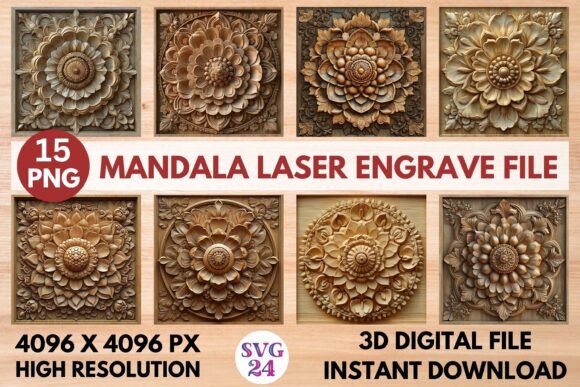
Mandala designs have long been celebrated for their intricate beauty and spiritual symbolism. In recent years, they’ve found a new home in the world of laser engraving, where precision meets artistry. A Mandala Laser Engrave File is more than just an artistic pattern—it's a powerful tool for designers, hobbyists, and entrepreneurs looking to elevate their products with stunning detail. These files are specifically crafted for laser machines and come in high-resolution PNG format, making them ideal for a wide range of applications.
Why Choose a Mandala Laser Engrave File?
The appeal of mandalas lies in their complexity and symmetry. When translated into laser engraving, these characteristics become even more pronounced. The Mandala Laser Engrave File offers a ready-to-use solution that combines elegance with functionality. Whether you're engraving on wood, metal, or fabric, these designs ensure a professional finish every time. The high-resolution quality of 4096x4096 pixels means that each curve and line remains sharp and defined, even when scaled up or down for different materials.
What sets this file apart is its transparent background. This feature allows for seamless integration into various surfaces without worrying about unwanted borders or colors. You can place the design exactly where you want it, whether you’re personalizing a gift, creating custom packaging, or adding flair to tableware. It’s also important to note that these files are not editable, but they are optimized for resizing within your laser software—giving you flexibility while maintaining the integrity of the original design.
Compatibility Across Major Laser Machines
Laser engraving has become increasingly accessible thanks to user-friendly machines like Glowforge, XTool, Lightburn-compatible devices, Sculpfun, and CO2 lasers. The Mandala Laser Engrave File works well across most of these platforms, allowing users to bring their creative visions to life with minimal hassle. However, before purchasing, it’s crucial to verify that your specific machine and software support high-resolution PNG files. While many systems do, some may require additional settings or conversions to achieve optimal results.
For example, if you're using Lightburn, you’ll find it easy to import and scale the design. Similarly, Glowforge users will appreciate how quickly the file integrates into their design workspace. Always test a small sample before committing to a full project, especially if you're working with delicate materials like paper or thin textiles.
Applications Across Industries and Projects
One of the best things about mandalas is their versatility. They can be adapted for numerous purposes, from home decor to fashion. Here are some of the key industries and projects where a Mandala Laser Engrave File shines:
- Home Decor: Use mandalas to personalize wooden picture frames, mirrors, or wall art. The fine details create a meditative, calming effect perfect for living rooms or bedrooms.
- Woodworking: Incorporate mandalas into furniture, coasters, or cutting boards. These engravings add a unique touch to handcrafted items and make excellent gifts.
- Stationery & Textiles: From engraved notebooks to fabric patterns, mandalas offer a timeless aesthetic. They can be used as embellishments on greeting cards, journals, or even clothing prints.
- Tableware: Custom mugs, plates, and serving trays engraved with mandalas are both functional and beautiful. They're popular at boutique shops and online marketplaces.
- Paper & Packaging: Create eye-catching invitations, gift tags, or product packaging with mandala motifs. The transparency of the PNG makes layering and combining designs effortless.
These examples highlight how a single Mandala Laser Engrave File can serve multiple roles. Whether you're running a small business or experimenting with DIY projects, having access to such a versatile design can streamline your workflow and enhance your output.
Understanding the File Format and Content
When you purchase a Mandala Laser Engrave File, you'll receive a digital ZIP package containing 15 high-quality PNG images. Each image is meticulously prepared with grayscale in mind, ensuring consistent depth and contrast when engraved. Since these are not layered SVG cut files, they are limited to engraving rather than cutting, which is important to consider depending on your project needs.
Despite the lack of layers, the clarity and crispness of the PNG format make it highly effective for engraving. You won’t need to spend time editing or adjusting vector paths—just import, scale, and engrave. That said, the buyer must take responsibility for resizing the design to fit their chosen material or product. Most laser software includes tools for scaling and positioning, so with a little practice, you can master this step quickly.
Factors to Consider Before Purchasing
Before investing in a Mandala Laser Engrave File, there are several practical considerations to keep in mind:
- Machine Compatibility: As mentioned earlier, always check that your laser machine supports PNG files. Some systems prefer vector formats like SVG or DXF, though PNGs are widely accepted for engraving.
- Material Suitability: Different materials respond differently to laser engraving. Wood and acrylic tend to show off mandala details beautifully, while leather and fabric may require adjustments in power and speed settings.
- Design Scale: Because these files aren't editable, you'll need to resize them carefully. Over-enlarging can lead to pixelation or loss of detail, so it's best to work within the recommended size limits of your machine.
- Project Purpose: Are you planning to use these for commercial sales or personal use? If you're selling engraved products, consider how the mandala design aligns with your brand and target audience.
- File Quality: High-resolution PNGs (like those included in the Mandala Laser Engrave File set) are essential for clean, precise engravings. Lower resolution can result in blurry or uneven lines, especially on detailed patterns.
By evaluating these factors, you can ensure that the Mandala Laser Engrave File fits your creative goals and technical setup. Taking a few minutes to understand your machine’s capabilities can save hours of frustration later on.
Practical Tips for Using Mandala Laser Engrave Files
To get the most out of your Mandala Laser Engrave File, here are a few tips based on real-world usage:
- Test First: Print a small-scale version of the design on scrap material to see how it looks before engraving the final piece.
- Use Proper Settings: Adjust your laser’s power and speed settings according to the material you're engraving. Hardwoods may need higher power, while soft woods or paper require lower intensity to avoid burning or distortion.
- Layer Thoughtfully: If you're combining the mandala with other elements (like text or logos), plan the layout carefully. The transparent background makes layering easy, but alignment is key to a polished look.
- Experiment with Color: While the file is grayscale, some laser machines allow color variations by adjusting laser passes or using dye-based inks. Explore what your system can do!
- Store Safely: Keep your digital files organized in a secure folder. Backups are always a good idea, especially if you rely on these designs for regular production.
These small adjustments can significantly impact the final outcome of your project. Think of the Mandala Laser Engrave File as a foundation—you build upon it with your own creativity and technique.
How to Integrate Mandalas into Your Workflow
Incorporating mandala designs into your laser engraving workflow can boost productivity and expand your creative options. For example, if you run a small shop that sells personalized items, you could use these files to create a signature collection. Offer customers the option to choose from different mandala designs, and then engrave them onto wooden keychains, ceramic mugs, or glass vases.
Another great approach is to batch-produce items. With 15 unique PNG files in one set, you can rotate through different designs weekly or monthly, keeping your inventory fresh and appealing. This strategy is particularly effective for online stores or pop-up markets where variety attracts buyers.
For educational workshops or maker spaces, mandalas provide an engaging challenge for students learning laser engraving techniques. Their repetitive yet complex nature helps learners understand how laser settings affect fine details, making them an excellent teaching tool.
Getting Started with Mandala Laser Engraving
If you're new to laser engraving, don’t let the complexity of mandalas intimidate you. Start with simple materials like basswood or MDF to test your machine's response. Import the Mandala Laser Engrave File, scale it appropriately, and begin with low power settings. Once you’re comfortable with the process, you can experiment with more challenging materials like bamboo, marble, or leather.
Also, remember that mandalas can be combined with other design elements. Try adding a name or date inside the center of the pattern for personalized items. Or overlay the mandala with subtle textures to give your products a more organic feel. The possibilities are endless when you pair these files with thoughtful design choices.
Final Thoughts on Choosing the Right File Set
Not all laser engrave files are created equal. The Mandala Laser Engrave File stands out because it’s purpose-built for laser machines, with attention given to resolution, clarity, and compatibility. It’s a premium resource for anyone who wants to bring a touch of spirituality and sophistication to their work.
While it may not be a layered SVG or editable file, its strength lies in its simplicity and precision. You can focus on positioning and scaling without getting bogged down in complicated edits. And with 15 distinct designs, you're getting a robust library to draw from.
As the demand for custom and artisanal goods continues to grow, having access to high-quality, ready-to-engrave designs like the Mandala Laser Engrave File becomes a competitive advantage. Whether you're crafting for yourself, clients, or wholesale partners, these files help you deliver professional-grade results consistently.
Where to Find and How to Purchase
Many online marketplaces and design stores now offer Mandala Laser Engrave Files as part of their digital product lineup. Look for sellers that provide clear information about file types, resolutions, and machine compatibility. Reading reviews from other laser engravers can also help you gauge the file's quality and usability.
Once you’ve selected the right file set, the download is usually immediate after payment. You’ll receive a ZIP file containing all 15 PNGs, which you can extract and store on your computer for easy access. Make sure to read the seller’s instructions for importing the file into your software, as steps can vary slightly between platforms.
Investing in a Mandala Laser Engrave File isn't just about acquiring a design—it's about unlocking a new dimension of creativity and professionalism in your laser projects. So take the time to understand your machine, test your settings, and explore the many ways these elegant patterns can transform your work.