Buffalo Laser Engrave File Evaluation
In the realm of digital fabrication and laser crafting, the distinction between a standard image file and a purpose-built engraving asset is critical. For makers utilizing CO₂ lasers, fiber markers, or diode-based systems such as xTool, Glowforge, and Sculpfun, the quality of the source file often dictates the final aesthetic outcome. The Buffalo Laser Engrave File represents a specialized digital asset designed specifically for high-resolution grayscale engraving. This evaluation explores the technical specifications, practical applications, and decision-making factors associated with this premium PNG file set, helping creators determine if it aligns with their specific project requirements.
Understanding the Buffalo Laser Engrave File Format
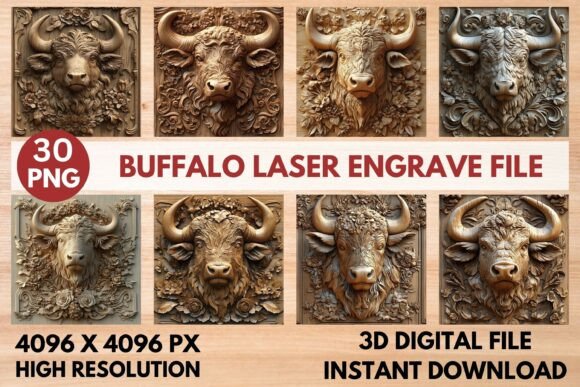
At its core, the Buffalo Laser Engrave File is not a vector graphic in the traditional sense, nor is it a cut file like an SVG or DXF. Instead, it is a raster-based solution optimized for grayscale rendering. The product includes 15 distinct coloring PNG files and 15 corresponding grayscale PNG files, all rendered at a resolution of 4096 x 4096 pixels. This high pixel density ensures that intricate details remain crisp when scaled to various material sizes, provided the physical dimensions do not exceed the printer’s DPI limitations.
The inclusion of transparent backgrounds in these PNG files allows for seamless integration into existing design workflows. Creators can overlay the buffalo motif onto other elements without dealing with white rectangular backdrops. However, it is important to note that these files are not editable in terms of vector manipulation. Users cannot easily adjust line weights or curve paths within software like Adobe Illustrator; rather, the file is intended to be imported directly into laser control software for processing.
Technical Specifications and Software Compatibility
One of the primary advantages of this file set is its broad compatibility with popular laser engraving ecosystems. Whether you are operating a desktop unit like a Glowforge or a more industrial CO₂ machine, the grayscale nature of the PNG allows for nuanced depth control. Unlike binary black-and-white images that simply burn where black exists, grayscale files interpret varying shades of gray as different levels of power or speed adjustments.
For users of LightBurn, the recommended workflow involves applying a dither filter, such as the Jarvis filter, to convert the grayscale data into a pattern of dots that simulates shading. This technique is particularly effective on lighter woods, where the contrast between the burned surface and the natural grain is most visible. Similarly, xTool and Sculpfun users can import these PNGs directly, leveraging the software’s built-in grayscale processing engines to achieve professional-grade results.
The high resolution of 4096 x 4096 pixels serves as a robust foundation for large-format projects. When paired with appropriate software settings, this resolution minimizes pixelation artifacts, ensuring that the fur texture and facial features of the buffalo design appear smooth and organic rather than jagged or blocky.
Practical Applications and Use Cases
The versatility of the Buffalo Laser Engrave File extends across multiple industries and hobbyist domains. Its primary strength lies in creating textured, artistic impressions rather than functional cuts. Consequently, it is exceptionally well-suited for:
- Home Decor: Creating rustic or modern wall art, coasters, and decorative panels using wood, acrylic, or leather.
- Textiles and Fashion: While primarily designed for rigid materials, the high-contrast patterns can sometimes be adapted for fabric marking or heat transfer applications, though care must be taken with delicate fibers.
- Packaging and Paper Products: Adding premium tactile elements to business cards, invitations, or packaging inserts through precise burning on cardstock.
- Tableware: Personalizing wooden plates, cutting boards, or serving trays with detailed imagery that withstands light use.
The design’s intricate detailing makes it particularly appealing for projects where realism or artistic depth is prioritized over geometric precision. It transforms simple blanks into statement pieces by adding visual complexity that flat-cut designs cannot achieve.
Optimization Settings and Workflow Considerations
To achieve optimal results, users must adhere to specific parameter recommendations provided by the creator. For Glowforge users, the suggested baseline settings are a speed of 1000 and a power of 90, utilizing the "Max Quality" mode with 5 passes, a Line Per Inch (LPI) setting of 270, and no masking. These settings are calibrated to balance burn depth with surface preservation, preventing excessive charring while maintaining detail.
However, these settings serve as a starting point rather than a universal rule. Material thickness, moisture content, and laser wattage significantly influence outcomes. A 40-watt laser may require slower speeds or multiple passes compared to a 100-watt CO₂ tube to achieve similar contrast. Makers are encouraged to conduct test runs on scrap material from the same batch as their final project to fine-tune power and speed variables.
Furthermore, the requirement for resizing implies that users must manage the aspect ratio carefully. While the file is square, the actual engraving area may need to be cropped or scaled to fit specific material dimensions. Because the file is not vector-based, aggressive scaling down can lead to loss of fine detail, making it essential to plan the layout before initiating the engraving process.
Evaluating Tradeoffs and Alternatives
While the Buffalo Laser Engrave File offers significant benefits in terms of ease of use and visual quality, there are tradeoffs to consider. The primary limitation is the lack of editability. If a user needs to modify the shape of the buffalo, add text, or adjust the composition, they cannot do so within the file itself. This necessitates either accepting the design as-is or investing time in recreating the elements using vector software.
Additionally, because this is a PNG file set, it relies entirely on the laser machine’s ability to interpret grayscale data accurately. Some entry-level diode lasers may struggle with subtle tonal variations, resulting in a posterized effect rather than a smooth gradient. In such cases, converting the image to a bitmap or using specialized dithering algorithms becomes necessary, adding a layer of technical complexity.
For projects requiring precise cutting alongside engraving, an SVG file would be a superior choice. SVGs allow for simultaneous vector cutting and raster engraving within a single job file, streamlining production. However, for purely decorative engraving tasks where cutting is not required, the PNG format provides a straightforward, plug-and-play solution that bypasses the need for complex vector tracing.
Conclusion: Is This File Right for You?
The decision to purchase the Buffalo Laser Engrave File should depend on your specific workflow and end goals. If you are looking for a high-quality, ready-to-print asset that delivers professional-looking grayscale engravings on wood, leather, or acrylic, this file set offers excellent value. The inclusion of both colored and grayscale versions, along with transparent backgrounds, enhances its utility for diverse design projects.
Conversely, if your projects demand extensive customization, vector editing, or integrated cutting operations, you may find the limitations of a static PNG file restrictive. In those scenarios, sourcing or commissioning a custom SVG design might be more appropriate. Ultimately, the Buffalo Laser Engrave File excels in scenarios where visual fidelity and ease of implementation are paramount, offering a reliable tool for makers seeking to elevate their laser engraving output with minimal setup friction.