Floral Pig Laser Engrave File
Crafting unique, high-quality items requires more than just a capable machine; it demands precise, well-optimized digital assets. For laser engraving enthusiasts and professionals alike, the Floral Pig Laser Engrave File represents a blend of rustic charm and technical precision. This design is not merely an image but a specialized tool crafted to bring elegance and character to your projects. Whether you are looking to create personalized home décor, intricate wood signs, or fashionable textile prints, this premium PNG design serves as an essential asset for laser machine owners who value sharp, intricate, and professional results.
The core appeal of this file lies in its specific optimization for laser engraving technology. Unlike standard vector files that require conversion or complex tracing, this grayscale PNG is ready-to-print and ready-to-engrave. It bridges the gap between artistic vision and mechanical execution, ensuring that the delicate lines of floral patterns and the textured details of the pig motif translate accurately onto various materials. By understanding how this file functions and why it matters to different types of creators, you can better determine if it fits into your workflow and project goals.
Understanding the Design and Technical Specifications
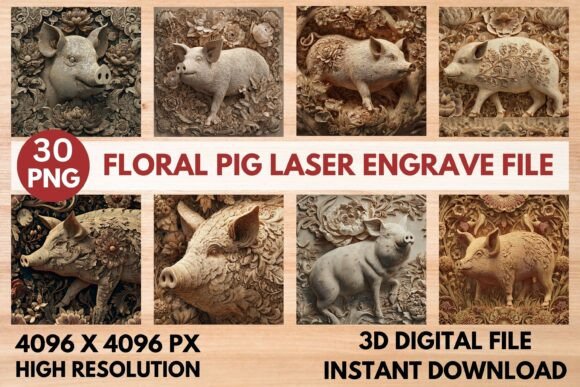
At its heart, the Floral Pig Laser Engrave File is a high-resolution digital asset designed specifically for compatibility with laser engraving software. The package includes 15 coloring PNG files and 15 grayscale PNG files, all sized at 4096x4096 pixels. This resolution ensures that even when scaled down for smaller items like stationery or jewelry tags, the image retains its clarity and detail. The transparent background feature allows for seamless integration into larger designs or direct engraving without unwanted borders.
It is crucial to note that these are not editable vector files. They are raster images optimized for dithering techniques used by lasers to create depth and shading. This distinction is vital for users to understand before purchasing. If you require a file where every line can be individually adjusted in Illustrator or CorelDRAW, this may not be the right choice. However, if you prioritize ease of use, immediate printing capability, and reliable grayscale rendering, this file offers significant advantages. The inclusion of both colored and grayscale versions provides flexibility, allowing users to experiment with different visual effects depending on their material and desired outcome.
Priorities Across Different User Groups
The value of the Floral Pig Laser Engrave File varies significantly depending on who is using it. A hobbyist might appreciate the simplicity and aesthetic appeal, while a small business owner will focus on production speed and commercial viability. Let’s explore how different audiences might evaluate this asset.
Beginners and Hobbyists
For those new to laser engraving, the learning curve can be steep. Understanding power settings, speed adjustments, and dithering filters often leads to trial-and-error waste. This file simplifies the process by providing recommended settings for popular machines like Glowforge and LightBurn. Beginners benefit from the clear instructions, such as using a Jarvis filter in LightBurn for optimal compatibility. This reduces frustration and increases the likelihood of a successful first project. The rustic yet refined look of the floral pig also appeals to hobbyists who want to create charming gifts or decorative items without needing advanced design skills.
Experienced Users and Professionals
Seasoned laser operators know that consistency is key. The high-resolution quality of this PNG ensures sharp, intricate results that meet professional standards. Professionals often work with a variety of materials, from light woods to coated textiles. The grayscale version of the file is particularly valuable here, as it allows for nuanced control over contrast and depth. Experienced users can adjust the power and speed settings based on their specific machine capabilities, knowing that the source file is robust enough to handle fine adjustments without losing integrity. The ability to produce high-quality, detailed engravings quickly makes this file a reliable tool for meeting tight deadlines.
Small Business Owners and Entrepreneurs
For entrepreneurs creating products for sale, efficiency and marketability are paramount. The Floral Pig Laser Engrave File supports a wide range of product ideas, including packaging, paper crafts, and tableware. The versatility of the design allows businesses to expand their inventory with minimal additional design costs. Since the file is provided in a ZIP format with multiple variations, users can test different looks on various materials to see what resonates with their audience. The commercial value lies in the ability to produce distinct, high-end looking items that stand out in a crowded marketplace. Furthermore, the fact that resizing is the buyer’s responsibility encourages strategic planning regarding product dimensions and pricing.
Educators and Content Creators
Educators teaching laser cutting and engraving can use this file as a practical example of raster-based engraving. It demonstrates how grayscale images translate into physical objects through dithering. Bloggers and content creators focusing on DIY projects can showcase the versatility of the design by creating tutorials on different materials and techniques. The file’s compatibility with major software platforms like xTool, Sculpfun, and CO2 Laser Cutting Machines makes it a universally useful resource for instructional content.
Practical Applications and Material Considerations
The applications for this design are nearly limitless. Home décor enthusiasts might use it to create custom wall art or decorative panels. Wood signs featuring the floral pig can add a touch of whimsy and sophistication to nurseries, kitchens, or living spaces. In the realm of fashion, the design can be engraved onto leather accessories or printed onto fabrics for unique clothing pieces. Stationery designers can incorporate the intricate floral patterns into wedding invitations or greeting cards, adding a tactile element that enhances the recipient’s experience.
Material selection plays a critical role in achieving the best results. As noted in the recommended settings, lighter woods yield the best results for grayscale engraving. This is because the contrast between the engraved areas and the natural wood tone is more pronounced. When working with darker materials or non-wood surfaces, users may need to adjust their power and speed settings accordingly. Testing on scrap pieces of the intended material is always advised to ensure the desired aesthetic is achieved.
Software Compatibility and Setup
One of the most important aspects of using this file is ensuring your software supports PNG inputs. Most modern laser engraving software does, but it is worth verifying before purchase. For LightBurn users, the recommendation to use the Jarvis dithering filter is crucial. This filter breaks down the grayscale image into a pattern of dots that simulate shades of gray, allowing the laser to create depth and texture. Using the grayscale PNG for this purpose ensures maximum accuracy and detail retention.
Glowforge users have specific recommended settings: Speed 1000, Power 90, Grayscale Vary Power, Max Quality Lines Per Inch 270, Passes 1, and No Masking. These settings serve as a starting point. Users should feel empowered to tweak these values based on their specific machine’s performance and the material being used. The goal is to achieve a balance between engraving depth and surface preservation.
Final Thoughts on Choosing the Right Asset
Selecting the right digital asset for your laser engraving projects involves balancing creativity with technical feasibility. The Floral Pig Laser Engrave File offers a compelling option for those seeking a design that is both visually appealing and technically optimized. Its high-resolution nature, combined with specific recommendations for popular software and machines, makes it a practical choice for a wide range of users. Whether you are creating a one-off gift or mass-producing merchandise, this file provides the foundation for elegant and professional results. By understanding its strengths and limitations, you can integrate it seamlessly into your creative process and bring your projects to life with confidence.