Grasshopper Laser Engrave File
In the realm of digital fabrication, the transition from a creative concept to a physical object relies heavily on the quality of the input data. For laser engraving enthusiasts and professionals alike, the source file is not merely an image; it is the blueprint for depth, contrast, and texture. The Grasshopper Laser Engrave File represents a specialized asset designed to bridge the gap between complex geometric design and practical manufacturing. This high-quality 3D PNG set is engineered specifically for laser machines, offering users a ready-to-print solution that minimizes trial-and-error while maximizing visual impact.
Understanding where this file fits into your workflow requires recognizing the specific challenges of laser engraving on various substrates. Unlike vector cutting, which follows simple paths, engraving involves modulating power and speed to create tonal variations. A standard raster image often lacks the necessary detail or dynamic range to translate effectively through a laser’s focal point. The Grasshopper design addresses this by providing optimized grayscale and coloring PNGs that are pre-calibrated for high-resolution output, ensuring that intricate details remain sharp whether you are working with wood, acrylic, leather, or metal.
Technical Specifications and Asset Structure
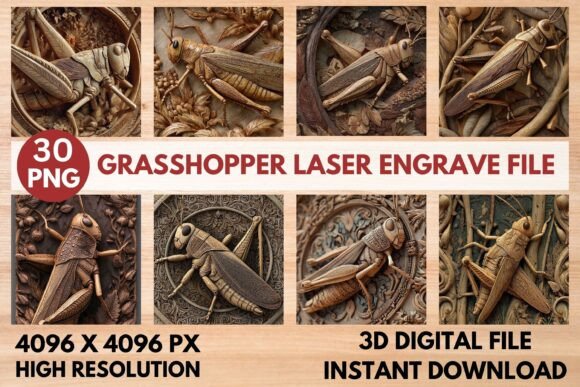
The core value of the Grasshopper Laser Engrave File lies in its technical composition. It is not a single image but a comprehensive package containing thirty distinct files: fifteen coloring PNGs and fifteen grayscale PNGs. Each file is rendered at a high resolution of 4096x4096 pixels, providing ample pixel density for large-format engravings without sacrificing edge definition. This resolution ensures that fine lines and subtle gradients are preserved during the transfer from screen to material.
The inclusion of both coloring and grayscale variants offers significant flexibility in post-processing and artistic direction. Grayscale images are typically preferred for traditional dithering techniques, allowing the laser to simulate shades of gray through varying dot densities. Conversely, the coloring PNGs can be utilized for more stylized effects or when integrating color mapping software within platforms like LightBurn. Both sets feature transparent backgrounds, which simplifies the layout process by removing unnecessary white space and allowing the design to sit cleanly on any substrate shape or size.
- High Resolution: 4096x4096 pixels ensures clarity across all scales.
- Dual Format Support: Separate files for color and grayscale workflows.
- Transparent Backgrounds: Facilitates easy placement and alignment.
- Ready-to-Print: No additional editing required before sending to the machine.
Integration with Popular Laser Software
Successful implementation of the Grasshopper design depends on how well it integrates with your chosen laser control software. Most modern laser cutters operate using either proprietary interfaces or third-party applications like LightBurn. The file is optimized for these environments, but understanding the specific instructions for each platform is crucial for achieving professional results.
For users operating within LightBurn, the recommendation is to utilize the grayscale PNGs and apply a Jarvis dither filter. Dithering converts continuous-tone images into patterns of dots that the laser can interpret as varying levels of darkness. The Jarvis algorithm is particularly effective because it balances noise and pattern regularity, resulting in smoother gradients and fewer visible artifacts. By setting the image mode to grayscale and applying this filter, you allow the software to calculate the precise pulse durations needed for different tonal values, ensuring accuracy and contrast.
When using the Glowforge interface or similar cloud-based systems, the approach shifts slightly toward direct power modulation. The recommended settings for Glowforge involve running the file at maximum quality with a Line Per Inch (LPI) setting of 270. This high LPI value captures the fine details inherent in the Grasshopper design. The software’s Vary Power feature is essential here, as it adjusts the laser’s intensity based on the pixel brightness, creating a true 3D effect rather than a flat silhouette.
Recommended Settings for Glowforge
- Speed: 1000
- Power: 90
- Mode: Grayscale Vary Power
- Max Quality: 5
- LPI: 270
- Passes: 1
- Masking: None
Substrate Compatibility and Material Considerations
While the Grasshopper Laser Engrave File is versatile, its performance is inherently tied to the material being engraved. The design’s high contrast and intricate details shine brightest on materials that accept tonal variation well. Wood remains the most popular choice, particularly lighter varieties such as birch, maple, or basswood. These woods have consistent grain structures that do not interfere with the fine dots produced by the dithering process, allowing the 3D illusion to take hold.
Acrylic, especially cast acrylic, responds exceptionally well to laser engraving due to its ability to frost uniformly under laser heat. When used with the coloring PNGs, acrylic can produce vibrant, multi-tonal effects that mimic stained glass or painted surfaces. Leather offers a rich, organic backdrop where the Grasshopper design can add texture and depth, turning a simple belt or wallet into a customized piece of art. Even paper and cardstock benefit from the precision of the 4096x4096 resolution, making the file suitable for high-end stationery and packaging prototypes.
It is important to note that darker or highly varnished materials may require adjustments to the power and speed settings. Metal engraving, while possible with fiber lasers or coated metals, demands a different approach entirely, as the interaction between the laser and the metallic surface differs significantly from organic materials. Always conduct test runs on small sections of your material to calibrate the settings before committing to a full production run.
Workflow Optimization and Efficiency
Integrating the Grasshopper Laser Engrave File into your business or hobby workflow offers several efficiency gains. Because the files are pre-optimized, you eliminate the time-consuming process of manually adjusting contrast, brightness, and dithering parameters for every new project. This is particularly valuable for entrepreneurs and makers who need to turn around custom orders quickly. The "ready-to-print" nature of the assets means you can focus on customer communication, material preparation, and finishing touches rather than troubleshooting file errors.
Furthermore, the non-editable nature of the PNG files ensures consistency. Since the design cannot be altered, every copy produced will be identical, maintaining brand integrity if you are selling standardized products. This restriction also protects the intellectual property of the designer while giving the buyer peace of mind that they are receiving exactly what was advertised. Resizing is permitted, but it is best practice to scale down rather than up to preserve image fidelity.
Practical Implementation Tips
To get the most out of this asset, consider the following practical tips during your execution phase:
- Material Preparation: Ensure your material surface is clean and level. Uneven surfaces can cause focus issues, leading to blurred details in the Grasshopper design.
- Focal Accuracy: Double-check your lens focus before starting. A slight deviation can significantly alter the depth perception of the 3D effect.
- Test Patterns: If you are new to a specific material, run a small test patch to determine the optimal power and speed combination. The recommended settings are starting points, not absolute rules.
- Post-Processing: For wood projects, consider sanding lightly after engraving to remove char and reveal the natural grain beneath the engraved areas. This enhances the contrast and brings out the details of the Grasshopper pattern.
The Grasshopper Laser Engrave File is more than just a graphic; it is a tool for enhancing the capabilities of your laser equipment. By leveraging its high-resolution structure and optimized formats, you can achieve stunning, professional-grade results across a wide range of materials. Whether you are creating home décor, fashion prints, or industrial signage, this file provides the foundation for efficient, high-quality production. Its compatibility with major laser platforms and straightforward integration make it an invaluable addition to any maker’s digital library.